
Engineered-protein debate
This page has four parts, in the order you use them. Part 1 is what you need to know. Part 2 says what to do, in plain English. Part 3 shows the work done once on a case that is not yours. Part 4 is your own work and where to turn it in.
Open your materials, follow the steps, then turn in your work.
Argue whether engineered proteins made by cloned cells should be widely used and how they should be priced.
Optional: listen or watch a unit review▸
Part 1 of 4 · Background and definitions▸
💡 Big idea: Life-saving biotechnology raises hard questions about access because the same product must pass separate gates of price, patents, and regulation, so who controls those gates decides who the science actually helps.
- • Recombinant proteins are produced by host cells carrying an inserted human gene.
- • Engineered transformed diabetes care but access remains unequal globally.
- • Pricing, intellectual property, and regulatory approval each reflect stakeholder values.
Is it ethical to grant the Vargo family their request?
Life-saving biotechnology raises hard questions about access because the same product must pass separate gates of price, patents, and regulation, so who controls those gates decides who the science actually helps.
Driving question: has been made by engineered cells since 1982, so why does a person with diabetes in Cleveland sometimes ration a drug that costs only a few dollars to manufacture?
What you already know: From the class before the John Carroll debate: Each technique answers one narrow question, so only reading them together produces a decision that is not accidentally resting on the wrong evidence.
New idea: Life-saving biotechnology raises hard questions about access because the same product must pass separate gates of price, patents, and regulation, so who controls those gates decides who the science actually helps.
Visual or model: No figure is attached to this lesson. The readings, the worked example and E1 to E3 carry the evidence.
- Observe or measure the relevant feature in engineered- debate.
- Organize the observation with a stable evidence ID.
- Apply this rule: Use science to estimate consequences, then state the value judgment and tradeoff that determine the decision.
- Choose the option the evidence supports and state the limit of the conclusion.
Real biomedical example: has been made by engineered cells since 1982, so why does a person with diabetes in Cleveland sometimes ration a drug that costs only a few dollars to manufacture?
What the evidence supports: E1 to E3 support the daily take-home when the response meets the stated success criteria.
What it cannot prove: The package does not support claims beyond this lesson's or any real patient diagnosis.
- • : A small, circular piece of that lives apart from a bacterium's main and is used in the lab to carry a chosen gene into a cell.
- • : An that joins two pieces of together by sealing the gap in their backbone, vital in genetic engineering.
- • : The process by which a bacterial cell takes up foreign , such as a , from its surroundings and begins using those new genes.
- • expression: The process of turning a gene on so its instructions are used to make RNA and , deciding when and where a gene is active.
Use it now: Choose one decision option. Cite E1 and E3, then explain how the rule connects the evidence to your choice. This is thinking practice for the one turn-in named under Turn in, not a second submission.
Go further, optional: The source links below are optional enrichment. Every fact required for today's local evidence decision appears in this lesson package.
A defensible biomedical decision separates scientific evidence from value judgments, identifies who may benefit or be burdened, and states the uncertainty and tradeoffs that remain.
Limit: Scientific evidence can inform the options and likely consequences, but it cannot choose a single value-neutral answer.
Use science to estimate consequences, then state the value judgment and tradeoff that determine the decision.
Limit: A review-board model organizes reasoning but does not make one ethical principle automatically outweigh every other principle.
You can weigh benefits and concerns of engineered proteins.
Limit: E3 defines the classroom product or success criterion. It is not independent scientific evidence and cannot justify a clinical or causal claim.
Today's decision · Simulated classroom evidence scenario
Your role: medical interventions team member
Decision: Your team must decide what the evidence from engineered- debate supports before submitting the exit response named on today's page.
- • Take a stance on access and price that names the likely consequences, the value judgment, and who is burdened.
- • Argue that the high price must come from expensive science, since itself costs only a few dollars to make.
- • Wait to argue a price until we know how much of the cost comes from patents versus insurance middlemen.
Response: State one choice, cite at least two evidence IDs, explain the rule that connects them, and add one limitation. Use it inside the one turn-in named under Turn in; it is not a separate submission.
Claim ceiling: Today's evidence supports a classroom claim about engineered- debate. It cannot prove causation, diagnose a real patient, or justify action outside this room.
Reason for review: Your team must decide what the evidence from engineered- debate supports before submitting the exit response named on today's page.
Context: A biotechnology can be scientifically brilliant and still fail people, because the same product must clear the separate hurdles of price, patent, and regulation before it reaches a patient.
- • T1: Read this briefing and note one benefit and one concern. An engineered (recombinant) is a human protein made by other cells: scientists put the human gene for the protein into host cells, such as bacteria, the cells read the gene and make the protein, and it is purified into a medicine. and growth are made this way (NHGRI). Today's question: should engineered proteins like insulin be widely used, and who should decide how they are priced? If myPLTW opens, Activity 4.1.2 Protein Factories has more.
- • T2: Pick a role: patient, biotech firm, regulator, or ethicist, and write your opening claim.
- • T3: Support your claim with one piece of evidence using the term recombinant .
- • T4: Write a rebuttal to a competing role's strongest argument.
- • T5: Record the class position and your personal stance with a reason.
- • E1: A defensible biomedical decision separates scientific evidence from value judgments, identifies who may benefit or be burdened, and states the uncertainty and tradeoffs that remain.
- • E2: Use science to estimate consequences, then state the value judgment and tradeoff that determine the decision.
- • E3: You can weigh benefits and concerns of engineered proteins.
Measurements: Use only the measurements, units, graph, or counts supplied in today's task. No additional patient measurement is implied.
Uncertainty: This is a composite classroom scenario. Missing history, measurements, or confirmation tests remain unknown and limit the conclusion.
Students often think if a drug is cheap to manufacture, it must be cheap to buy, so a high price must mean the science is expensive. The trap: Price is not set by manufacturing cost alone. Patents, research recovery, insurance middlemen, and regulation all push the price, so a drug that costs pennies to make can still be sold for hundreds. Confusing cost-to-make with price-to-buy hides the real decision-makers.
- CER:
- Claim, Evidence, Reasoning: make a claim, back it with evidence, explain your reasoning.
- SOP:
- Standard Operating Procedure, the exact steps to follow (especially in a lab).
- Tracker:
- Your PLTW progress log where you record completed evidence.
- myPLTW:
- The PLTW course site where you do the online activities. Find it in Clever with your Microsoft sign-in, right next to Schoology.
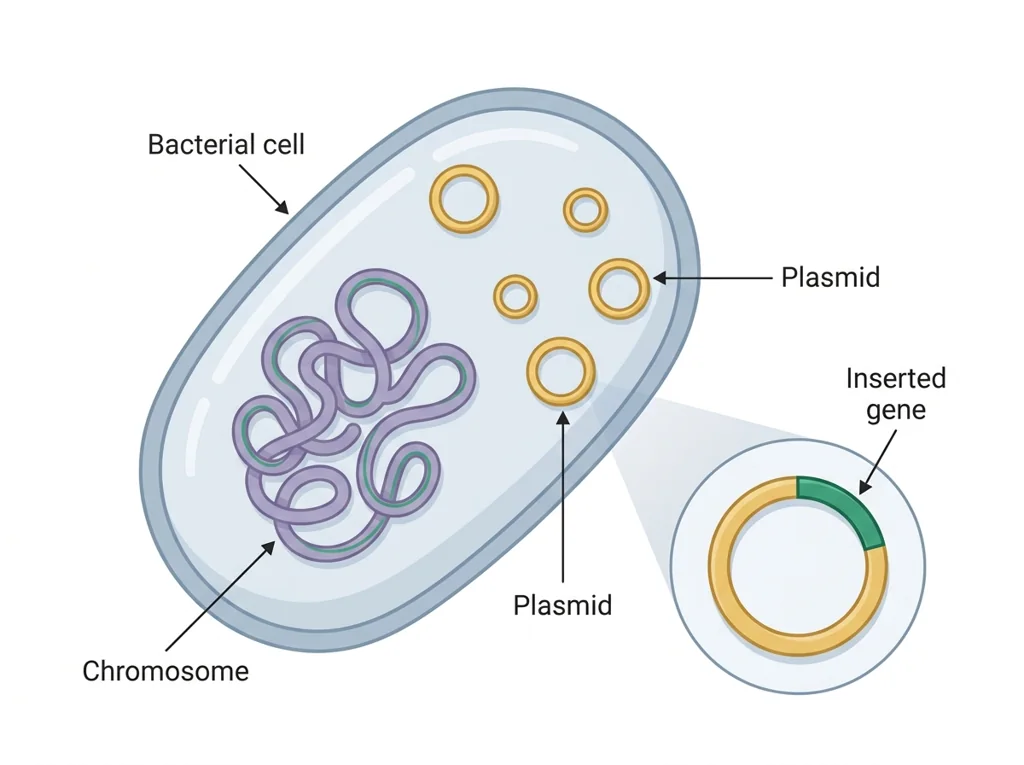
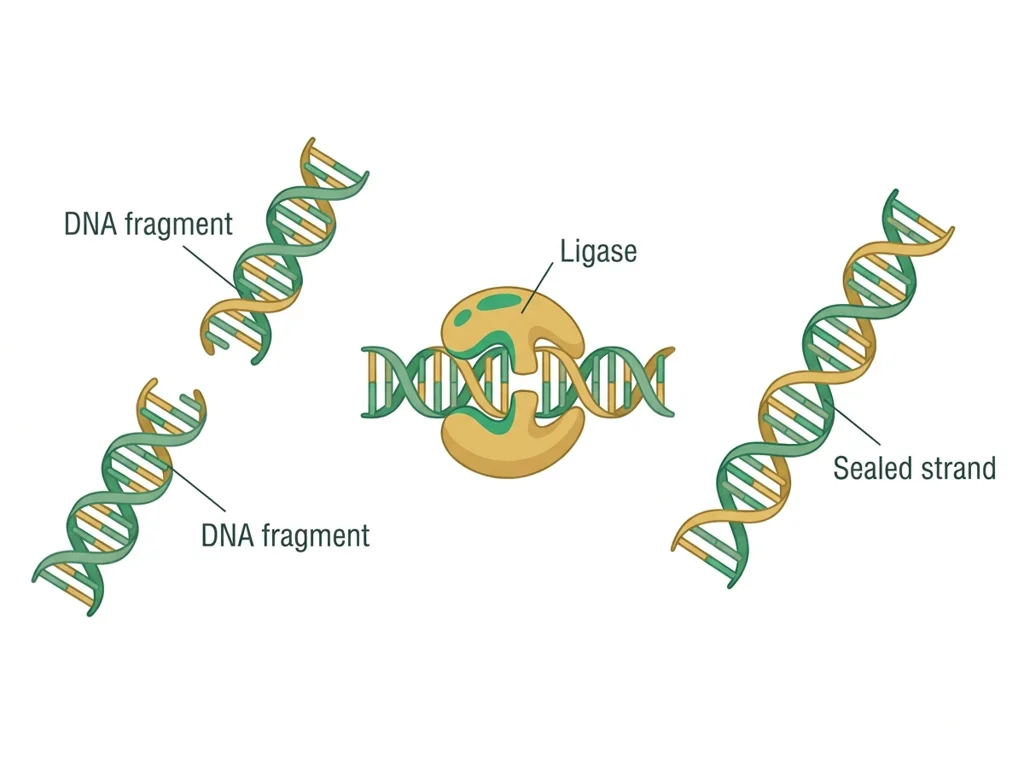
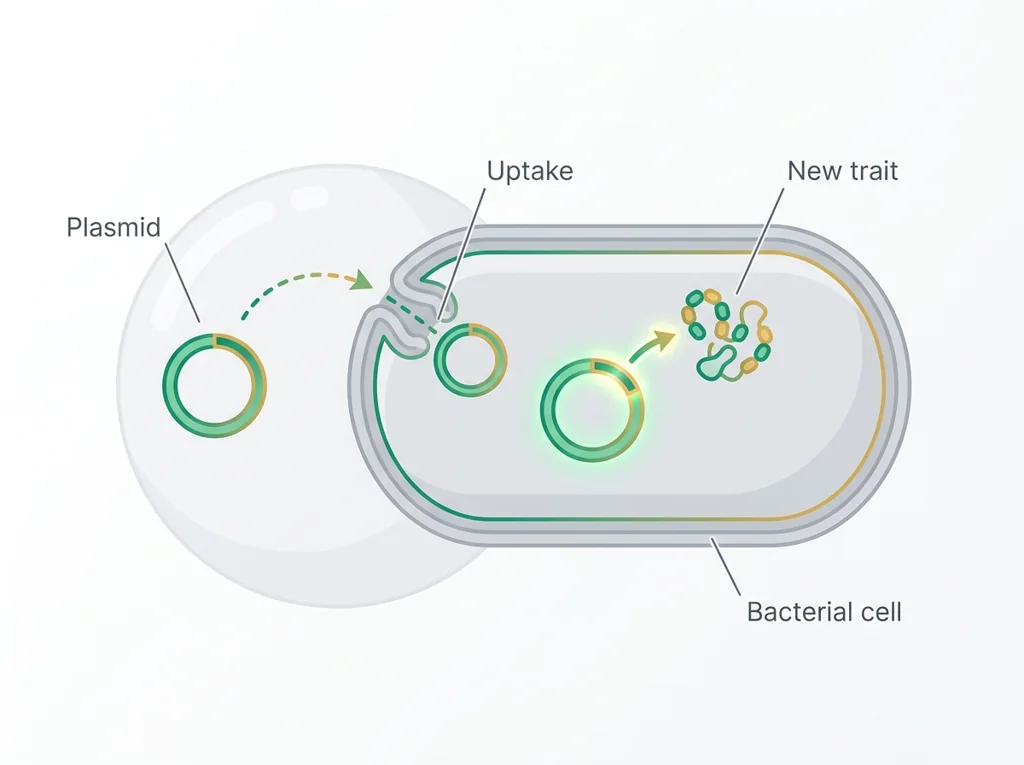
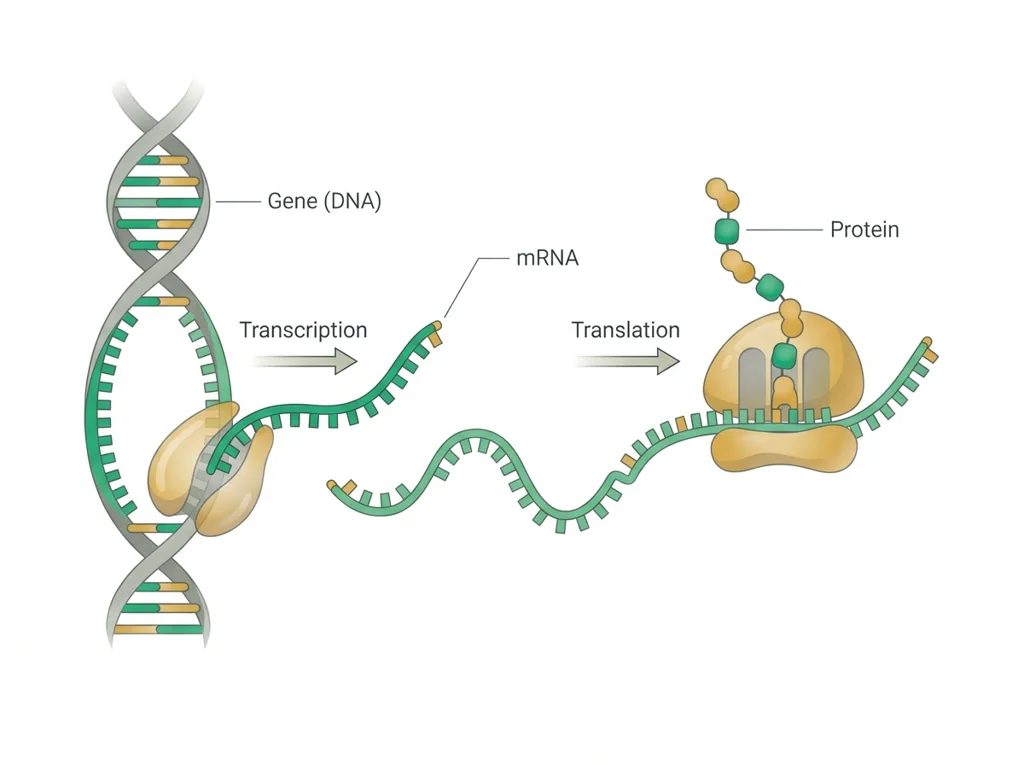
Tap the speaker to hear a term. Add two of these to your notebook glossary with a definition and an example in your own words.
Pick just 2 or 3 words from today and make them yours: write what each one means in your own words, name the context clue or evidence that helped, then give one example from what you actually did in Engineered-protein debate. Try your own words first; the glossary is there if you get stuck. This is voluntary and counts as extra credit, so keep it short.
Saved on this device. Show Mr. Mendoza or add these to your notebook glossary to claim the extra credit.
Part 2 of 4 · Directions in plain English▸
2.1 Open your materials
2.2 Start the work
Read this briefing and note one benefit and one concern. An engineered (recombinant) protein is a human protein made by other cells: scientists put the human gene for the protein into host cells, such as bacteria, the cells read the gene and make the protein, and it is purified into a medicine. Insulin and growth hormone are made this way (NHGRI). Today's question: should engineered proteins like insulin be widely used, and who should decide how they are priced? If myPLTW opens, Activity 4.1.2 Protein Factories has more.
Show all 5 required steps
- Read this briefing and note one benefit and one concern. An engineered (recombinant) protein is a human protein made by other cells: scientists put the human gene for the protein into host cells, such as bacteria, the cells read the gene and make the protein, and it is purified into a medicine. Insulin and growth hormone are made this way (NHGRI). Today's question: should engineered proteins like insulin be widely used, and who should decide how they are priced? If myPLTW opens, Activity 4.1.2 Protein Factories has more.
- Pick a role: patient, biotech firm, regulator, or ethicist, and write your opening claim.
- Support your claim with one piece of evidence using the term recombinant protein.
- Write a rebuttal to a competing role's strongest argument.
- Record the class position and your personal stance with a reason.
Lost your place? Check which of the five steps you finished: you should have (1) read the briefing and noted one benefit and one concern, (2) picked a role, (3) written a claim using recombinant protein, (4) written a rebuttal, and (5) recorded your stance. Resume at the first one you have not done.
- 0-8Read briefing; note one benefit and one concern
- 8-15Choose stakeholder role; draft opening claim using recombinant
- 15-30Build evidence list for your claim
- 30-50Pair debate: swap and rebut
- 50-65Class vote and discussion
- 65-80Record final stance; async post if remote
- • Engineered proteins like and growth exist because scientists inserted human genes into bacteria.
- • The science works, but who benefits and who pays are still contested questions.
- • Today you argue from four stakeholder positions before you learn how the process actually works.
- • This bioethics framing ties directly to the Biotech Research domain of your end-of-course WebXam for this class.
PLTW connection and today's work
Open the engineered-protein debate activity in myPLTW for Lesson 4.1 Manufacturing Human Proteins, Activity 4.1.2 Protein Factories, and review the CER rubric.
Today's stopping point: Unit 4 overview reserve evidence should be submitted; this debate opens the cloning unit.
PLTW activity titles identify the course connection. If your account will not open, use the posted materials for today and tell Mr. Mendoza. Do not mark an online activity complete unless you completed it.
Use the turn-in directions in Part 4 of this page. Do not create a second submission unless your teacher asks for one.
Show another explanation or a smaller first step
Need help? Choose a starting point
Part 3 of 4 · Worked example▸
This is a parallel case, not your own. Read it for the order of the work, then do your own in Part 4.
Claim (final stance): A life-saving vaccine, such as a childhood measles vaccine, should be made widely available and priced so that families can actually get it, with public health programs or insurance covering the cost when a family cannot pay.
Evidence (supporting point): Measles vaccines have been produced at large scale for decades and cut measles deaths sharply wherever coverage is high, yet outbreaks still return in communities where cost, distance, or missed doses keep vaccination rates low. This shows that a proven, protective product only prevents disease if people can actually receive it.
Reasoning: A vaccine protects not just the person who gets it but also people around them who cannot be vaccinated, because high coverage slows the spread of the disease. If price keeps coverage low, the disease keeps circulating, so the benefit of the technology is lost for the whole community, not only for the family that could not pay. That is why access and affordability, not just the existence of the vaccine, decide whether it does its job.
Rebuttal to the strongest opposing argument: The vaccine maker's strongest point is that revenue from sales pays for the research, testing, and quality control that keep the vaccine safe and available. My one-sentence rebuttal: Paying for safe production is necessary, but pricing a vaccine so high that many families skip it lets the disease spread and undermines the very protection the vaccine was made to provide, so the price should cover real costs without blocking access.
This model shows the level of evidence and organization needed to complete: Models the engineered-protein debate deliverable on a different scenario: a written final stance on the access and pricing of a life-saving vaccine, plus a one-sentence rebuttal to the opposing side's strongest argument. Use it as a format guide, not an answer key, because it argues a different case than today's prompt.
- Name the prompt or task.
- Answer it directly with the key evidence.
- Check that the response matches the requested format.
Keep the structure. Replace the question, facts, measurements, and evidence. Then recheck units, vocabulary, and whether the conclusion goes beyond the evidence.
Also due today: Post your stakeholder argument in Schoology discussion, reply to one classmate who took a different position, and submit your exit ticket.
A review board sorts scientific evidence, stakeholder needs, possible benefits, possible burdens, and uncertainty before choosing a policy.
- Which statements are scientific evidence?
- Which statements express a value or priority?
- Who receives the benefit and who carries the burden?
Use science to estimate consequences, then state the value judgment and tradeoff that determine the decision.
A review-board model organizes reasoning but does not make one ethical principle automatically outweigh every other principle.
- • Evidence cards map to source-backed findings.
- • Stakeholder cards map to affected people and priorities.
- • The recommendation maps to an explicit tradeoff with a named uncertainty.
Part 4 of 4 · Your work▸
Check your work before submitting
- You'll be able to weigh benefits and concerns of engineered proteins.
- You'll be able to defend a stance and respond to an objection.
4.1 Turn in your work
DueCheck the Schoology assignment for this day- Hand in
- Written final stance on engineered-protein access and pricing, plus a one-sentence rebuttal to the opposing strongest argument.
How to submit and name your file
Submit as one PDF in Schoology.
In Schoology, open your course and the assignment for this lesson. Attach your file, select Submit, and check that it appears in the submission.
PDF upload helpYou get two school days for every day you were absent, so this deadline moves with you.
Today's lesson is in Schoology
Each school day has one lesson page in Schoology that holds everything for the day: the goal, the story so far, every table and data value, the numbered steps, and what to turn in. Open it first and work from it. The other rows for this day, if any, are the score line for a paper quiz or test and the John Carroll debate item; they do not add work. Check Schoology for each deadline.
- Today's Lesson · Fri 12/4 · Wk15 · A DNA gel and a protein gel side by side, then insulin and who can afford it(today's lesson page: the goal, the data, the steps, and what to turn in are all on it)
Link will not open? Open Schoology, choose your course and section, and find the title shown above.
- CompleteEvery required part of the artifact is present, nothing left blank.
- AccurateThe science and the data are correct and match the evidence.
- Scientific reasoningYou explain your claim with evidence and reasoning (CER), not just an answer.
- Professional communicationClear, organized, labeled, and written the way a clinician or scientist would.
- SubmittedGo to Schoology to turn this in. Submit one PDF. Schoology attaches your name to your upload; on the page itself, write your period and code. Name the file: FirstName LastName - Assignment Title - YYYY-MM-DD.pdf. If you cannot get in, see Mr. Mendoza. Do not skip the work.
How this lesson connects
Keep using what you learned last class: Is it ethical to grant the Vargo family their request? Today: Life-saving biotechnology raises hard questions about access because the same product must pass separate gates of price, patents, and regulation, so who controls those gates decides who the science actually helps.
Practice: try a question, then check your answer▸
Claim ceiling for this check: Today's evidence supports a classroom claim about engineered- debate. It cannot prove causation, diagnose a real patient, or justify action outside this room.
A recombinant protein like insulin costs about 6 dollars to produce but sells to a patient for over 250 dollars. Name two things besides manufacturing that push the price up.
Write an answer and pick a confidence to unlock the key.
Fast retrieval with instant answers, not the commit-then-reveal check above. Try each from memory first: write what you remember about the earlier units, then check yourself here.
Missed class or ready for more?▸
Optional practice for this unit's lab skills. Nothing in it is due today.
What today's skills lead to. These are real health-science careers this course builds toward. Tap one to see, on the US Department of Labor's O*NET site, what the job actually involves, what it pays, and how fast it is growing.
Post a written engineered- argument from your stakeholder role in the course shell discussion, then reply to one classmate who took a different position.
Learn.Genetics: Gene Therapy and CloningSubmit as one PDF in Schoology.
Class still runs. Complete today's work as this page describes (it is self-guided). Need the concept taught without a teacher? Use this authoritative explainer:
Genetic Science Learning Center: CloningThe optional extra-credit track is open. Complete reserved-unit work from home, including virtual labs, for extra credit. Each item shows its correct submission route.
Open the extra-credit trackSources: slides, readings, and resources▸
The deck carries the prior idea forward, lets you inspect an analogy, maps the rule to biology, and ends with the same evidence decision and exit ticket used on this page.
Classroom documents for this lesson are posted in Schoology. Open Clever, then Schoology, and find each one by the name shown on its card.
Use this if you were absent, got stuck, or need another pass before you submit the lesson artifact.
Use this if you were absent, got stuck, or need another pass before you submit the lesson artifact.
Use this if you were absent, got stuck, or need another pass before you submit the lesson artifact.
Sign in to Clever with your district Microsoft account to open Schoology or myPLTW. Follow today's posted steps. If myPLTW will not open, use the posted alternative and tell Mr. Mendoza. Turn in your completed work through the Schoology assignment.
This week
My Progress dashboard