
About this site
How this site works
Here is an honest look at how this site works: where its information comes from, how it reaches your screen, and why it is built this way. Short version: your lesson pages use the live class plan, your privacy is protected, and the private teacher tools may show empty states until they are connected to a data source.
Download the map (PDF)How to use this site
- 1Start on “My Class”This is your home base. It shows today’s focus, what is due soon, and any announcements. If you only check one page, check this one.
- 2Open your courseTap your class to see the week-by-week plan and a calendar that shows the actual lesson titles, not just “busy.” You always know what is coming.
- 3Click into a dayEach day opens its learning target, the activity or lab, key vocabulary, and any links you need for that lesson.
- 4Watch Deadlines and AnnouncementsDue dates and class news show up automatically, so nothing sneaks up on you. Check them at the start of the week.
- 5Use “Class mastery” to study smartThis shows how the whole class is doing as an average, never your name or your grade. Use it to spot which topics to review before a test.
- 6Use the route named on the day pageEvery day page names one route under Submit here. Use that class form for a digital item, or make the physical handoff only when the page names it. Official PLTW activities are done in myPLTW, reached through Clever. Nothing is ever submitted in Schoology; Schoology carries the report-card grade only.
- 7Explore the AI ArcadeA safe place to meet the AI tools we use in class and practice using them responsibly.
- 8Find your clubs and programsHOSA, Chess, Brain Stormers and more each have a page with meeting times and what is happening next.
- 9Tell us how it is goingUse the Feedback link in the header any time. Your input actually shapes the class.
Your privacy is protected: the public pages only ever show class averages, never your name or your individual grades.
How the page is designed
Same shape every day
Every lesson page has the same parts in the same order: today's target, a minute-by-minute agenda, step-by-step directions, what is due, and what to do if you were absent. You always know where to look.
Scan, do not scroll
Pages lead with Today and This Week; long lists like the full calendar are tucked into collapsible panels so you are not buried in text.
Color-coded courses
Each course keeps one accent color across its pages, so you always know which class you are in.
Works on a phone, and on paper
The layout adapts to a phone, wide diagrams scroll sideways, and any lesson can be printed as a clean one-page card.
Clear, labeled actions
Buttons say exactly what they do (Open myPLTW, Turn in your work, Open Clever, If you were absent), and alignment chips show the official course, the WebXam test, and the PLTW lesson.
How this site is built to help you learn
Universal Design for Learning (UDL)
Multiple ways to access the same content: clear goals, a plain-language glossary, tap-to-hear vocabulary with pronunciations, printable cards, and visuals. The site is built so more learners can succeed without a separate version.
Clear targets and success criteria
Every lesson states the learning target and a "you will be able to" list, plus a "how this is graded" rubric, so you know the goal and what good work looks like before you start.
Claim, Evidence, Reasoning (CER)
You practice making a claim, backing it with evidence, and explaining your reasoning, the same way scientists and clinicians argue, including in the bioethics debates.
Spaced retrieval and cumulative review
Day pages mix in quick review questions from earlier units, not just today's. Revisiting material over time is one of the most reliable ways to make learning stick.
WebXam alignment, made visible
Each course shows how the Ohio end-of-course test is weighted and which PLTW work builds each part, and it flags the high-value topics to study extra. You always see why a task matters.
Lower cognitive load
Predictable structure, collapsible sections, and short daily artifacts keep attention on the science instead of on figuring out the page.
Never fall behind
Every day has absent-student directions and an offline fallback, so a missed class or a dropped connection does not stop your progress.
Privacy first (FERPA-safe)
Public pages only ever show class averages, never your name or your individual grades. Submitted files stay in the district OneDrive; report-card grades stay in Schoology and the district gradebook.
The biomedical pathway
How the four courses connect and build on each other, the labs and content in each, and the John Carroll University bioethics thread that runs through all of them.
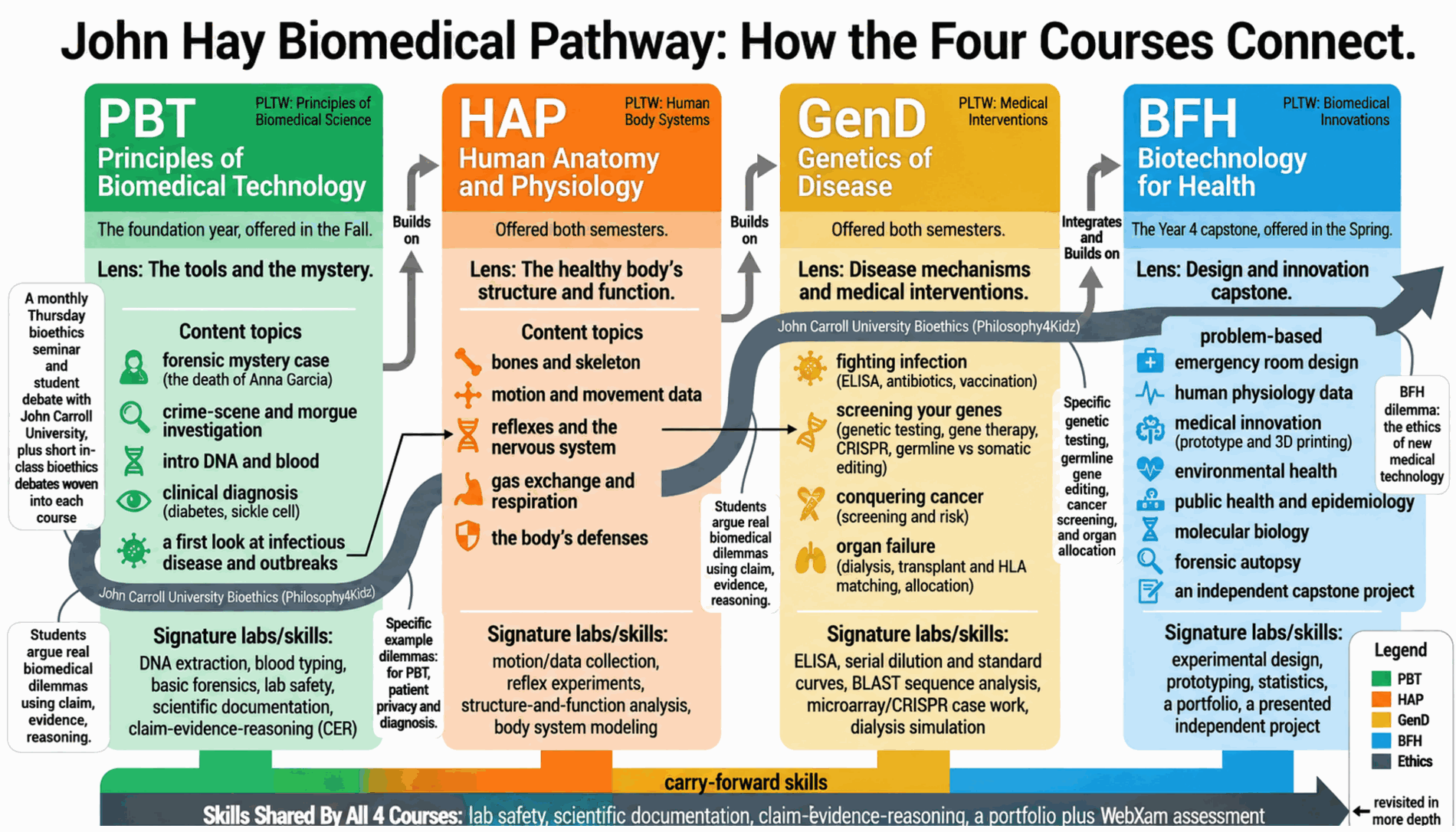
Site & source map
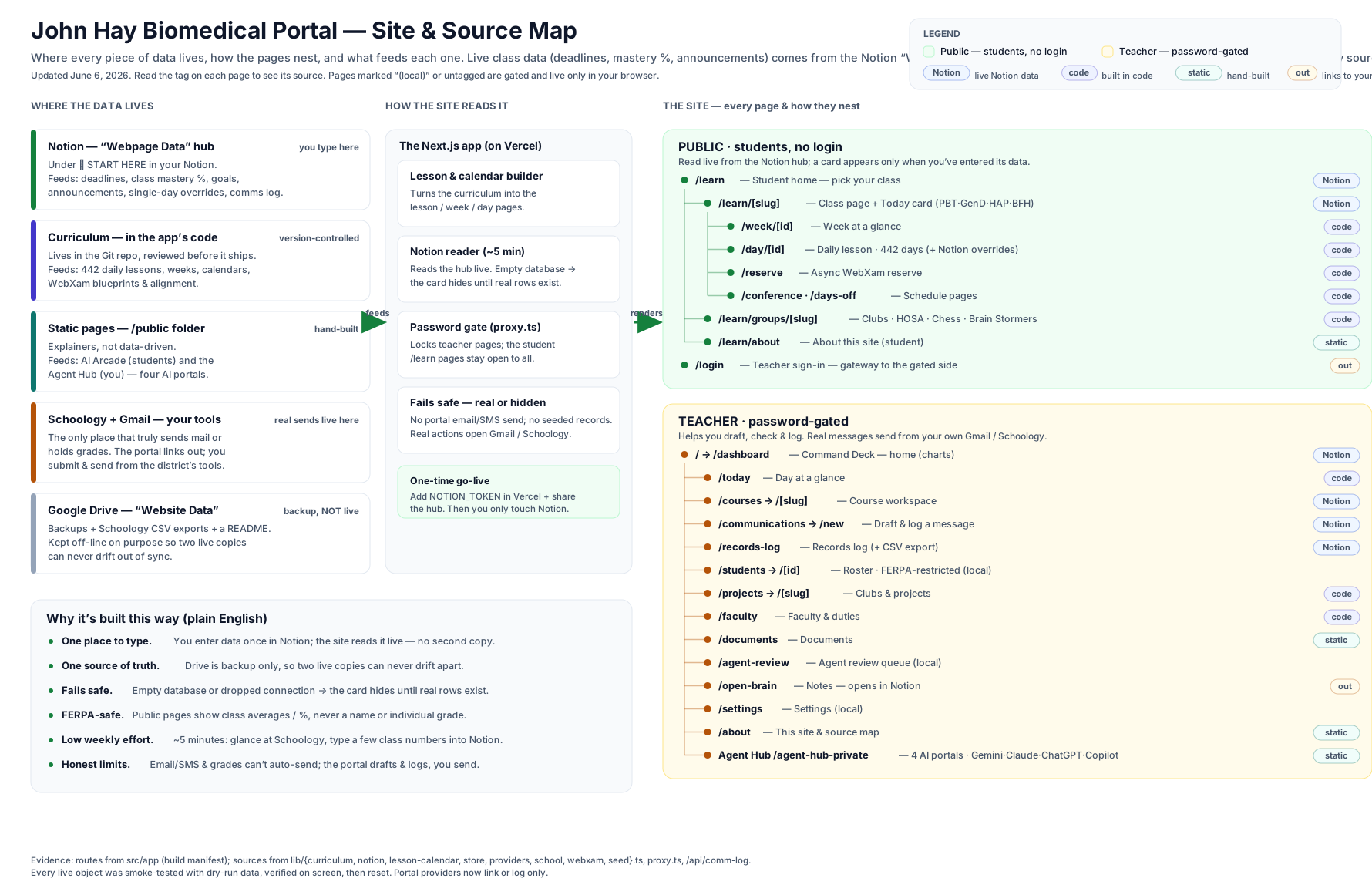
Tip: scroll the diagram sideways on a phone, or open the PDF above for a full-size copy.
In plain English
One place to type
The teacher enters everything in a Notion hub called “Webpage Data.” The website reads it directly, so what gets typed is what you see. There is no second copy to keep in sync.
Real or hidden
Numbers and cards on the student lesson pages come from a real source or simply hide when there is no data yet. Private teacher tools show empty states until a private source is connected.
Class-aggregate only (FERPA-safe)
Anything shown publicly is a class average or percent, never a student name or an individual grade. Submitted files stay in the district OneDrive; report-card grades stay in Schoology and the district gradebook.
The communications log lives in Notion
When the teacher logs a parent or student contact, it is saved to a Notion “Communications Log” so the record follows them across devices. The browser keeps an offline copy as a backup.
Built to fail safe
If the connection drops or a database is empty, the matching card just disappears. You never see a broken page or a made-up value.