
Medical Interventions / Genetics of Disease · Wednesday, September 16 · Mini lab · about 45 minutes
What is in the tube? Identify an unknown DNA read with BLAST
Take one real read of 500 bases, search it against millions of known sequences with the real NCBI tool, and name the bacterium it came from, with the numbers that support the name and the limits that go with it.
This page has four parts, in the order you use them. Part 1 is what you need to know: the story so far, what BLAST does, the words, the three-number rule and the links. Part 2 says what to do, click by click. Part 3 shows one finished run on a practice read that is not yours. Part 4 is your sample, your record and your conclusion.
Start: Part 1, then follow the steps in Part 2. Turn in: one document, once, described at the end of Part 4. Back to today's page
Part 1 of 4 · Background and definitions
What you need to know before you search
Everything the steps ask for is here. Read it once before Part 2, then come back by the section numbers the steps name.
1.1 The story so far
September 8. The outbreak investigation opened. Two people attend the same club; one feels ill. You wrote one case note for each of the seven main Day 1 histories, kept observed signs apart from reported symptoms, and drew a labeled contact map.
September 9 and 10. Research, then explanation. Eight candidate explanations sat on the table, R1 to R8, from a common cold to meningococcal disease to plain sleep deficiency. You revised the outbreak record and wrote a CER, under one ceiling: Day 1 evidence cannot confirm a pathogen or a source, and a possible explanation is not a diagnosis.
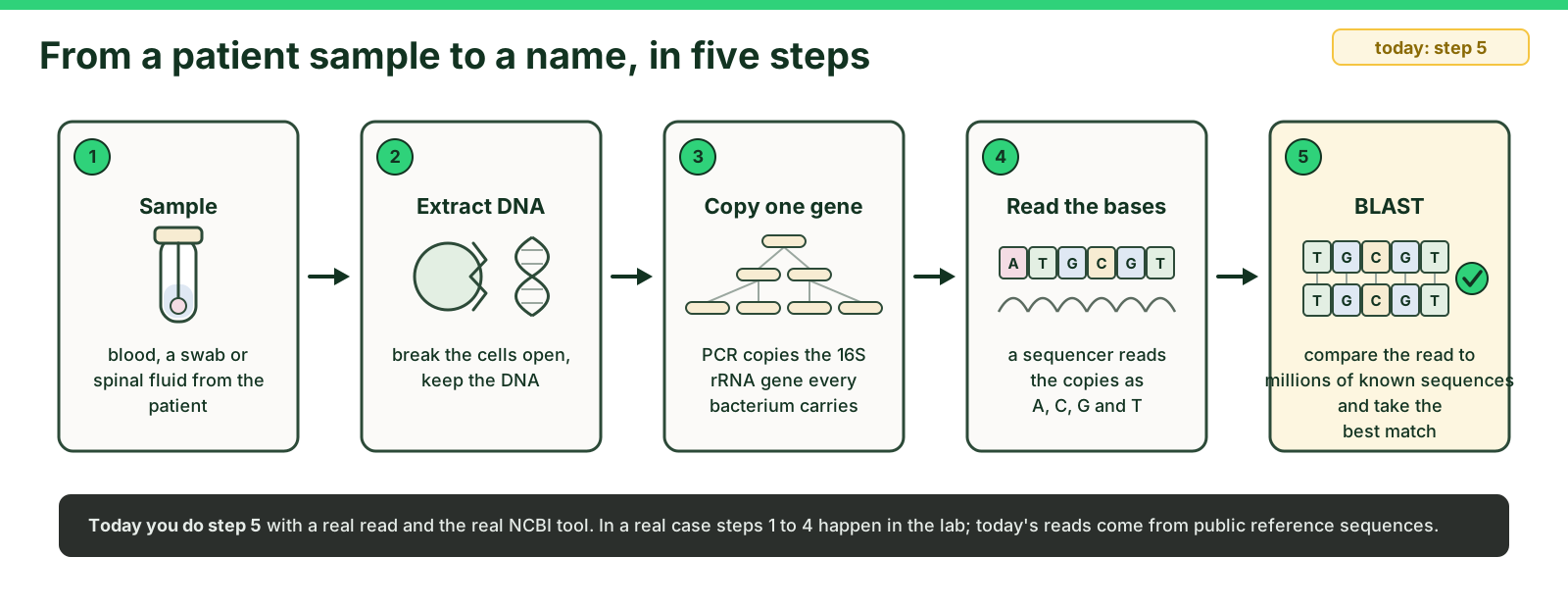
September 11. DNA sequencing basics. Nothing grew in the culture dish after two days, but a sequencer still returned a read. A read reports base order; the letters alone cannot name an organism. Naming comes later, by comparison with reference data.
September 14. The official BLAST computer lab with the PLTW trace and tutorial. The rule: a match supports a limited comparison, not proof of identity or disease causation. Where the files and settings got in the way, today's lab clears them.
September 15. Two hits compared. Percent identity, E value and query cover are read together before any qualified statement is written.
September 16, today. Two things. The allocation CER (who gets a scarce test) and this mini lab: a clean 500-base read, the real NCBI tool, and a name at the end. The case organism stays unnamed; these reads are practice isolates, not the case.
Today the read is clean and the tool is the lesson. Nothing you find here names the case organism; that comparison stays with the official activity. Used in steps 9 and 11.
1.2 What BLAST does
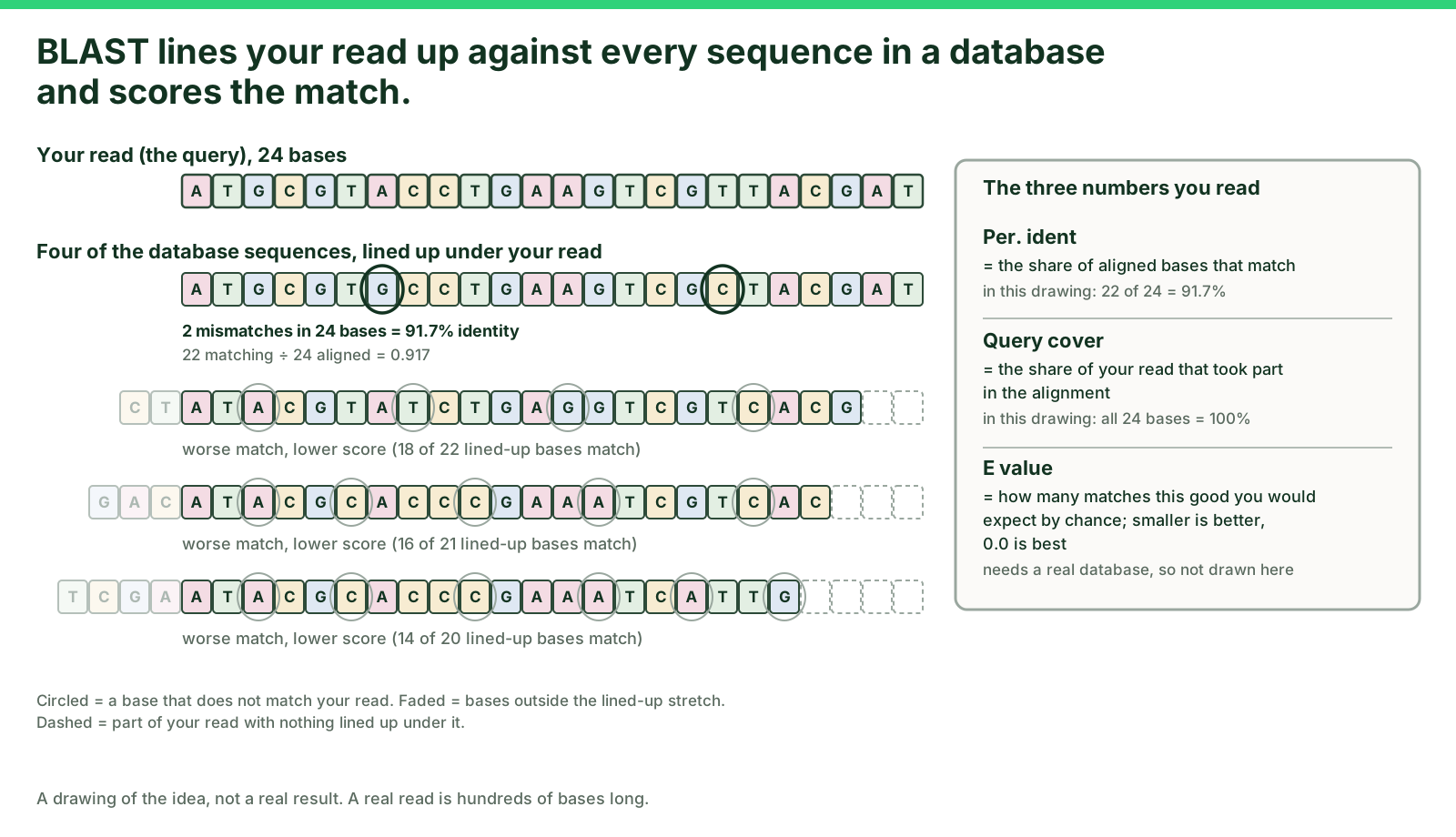
BLAST takes the sequence you give it (the query) and lines it up against every sequence in a database, base by base. For each database sequence it finds the best alignment and scores it. The results table lists the best matches first. Three numbers on each row tell you how much to trust the match. Used in steps 7 to 9.
1.3 The words you need
- Read
- The order of bases (A, C, G, T) reported for one piece of DNA. Each sample below is one read of 500 bases.
- 16S rRNA gene
- A gene every bacterium carries. Its sequence is similar within a species and different between species, so it is the standard gene for naming a bacterium from DNA.
- Query
- The sequence you paste into BLAST. Today, your sample's read.
- Database
- The collection of known sequences BLAST searches. The default, core_nt, holds sequences from a vast range of organisms.
- Hit
- One database sequence that matched your query, shown as one row of the results table.
- Percent identity (Per. Ident)
- Of the bases that were lined up, the percentage that match exactly. 100% means every compared base matched.
- Query cover
- The percentage of your read that took part in the alignment. 100% means the whole read was compared.
- E value
- The number of matches this good you would expect by chance in a database this size. 0.0 means the expected number of chance matches is too small to display. 2e-60 means 2 times 10 to the minus 60, which is also tiny.
- Accession
- The database ID of the matched sequence, such as NR_114042.1. Record it so anyone can open the same entry.
Used in steps 7, 9 and 11 and in every sentence of 4.4.
1.4 The three-number rule
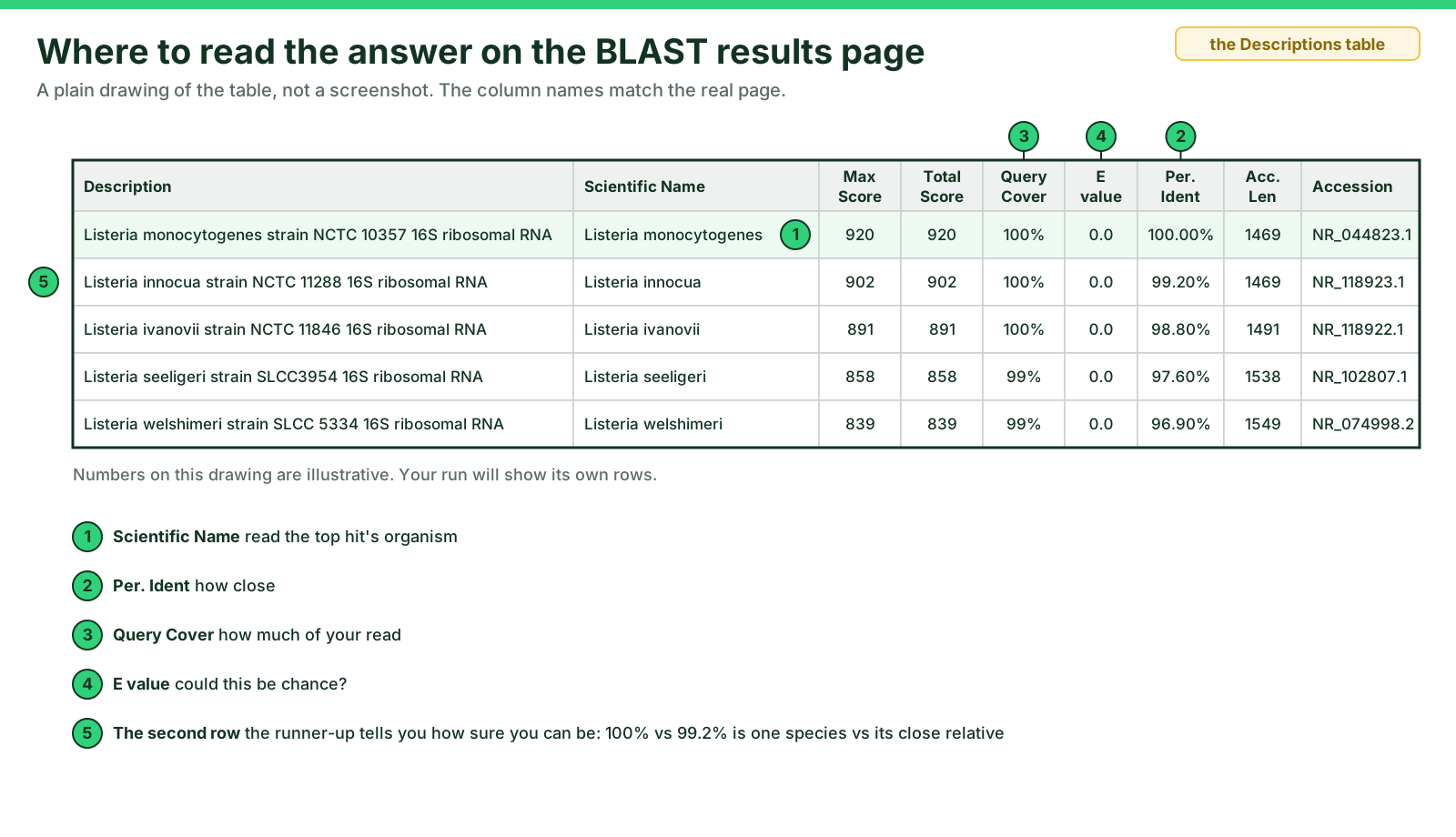
The three-number rule: Read percent identity, query cover and E value together before you name anything. Identity says how close the match is, query cover says how much of your read was compared, and E value says whether a match this good could be chance.
How to apply it today, as a classroom rule for these clean 500-base reads and not a universal cutoff: identity of 99% or more, query cover of 95% or more and an E value of 0.0 together support the organism named in row 1. Then look at row 2. If the next different species sits clearly lower (a full percentage point or more), the species name is supported. If the next different species sits at the same identity, only the genus is supported and the species stays uncertain. Used in step 9 and in 4.4.
1.5 The limit that applies to everything today
A BLAST match names the organism your read most resembles in the database. It does not say that organism caused anyone's illness, and a 16S read cannot always separate two very close species. Say what the numbers support and what stays uncertain.
Used in step 9 and in the Limit sentence of 4.4.
1.6 Links
- NCBI Nucleotide BLAST (blastn), the search page
- NCBI BLAST home
- NCBI Taxonomy Browser, the organism's classification by name
- CDC health topics A to Z, look up the disease by organism
- NCBI BLAST help (start page)
Each opens in a new tab so this page stays open. Used in steps 3 and 10.
1.7 Conduct for a computer lab
- Computer session only. No biological materials are handled today.
- Paste only the supplied sample reads into BLAST. Never paste your own name, a classmate's name, or any patient information into a public web tool.
- The three samples were prepared for this lab from public reference sequences. They are real bacterial sequences; they are not from any patient, not from the case file, and none of them is the case organism.
- If BLAST will not load on your device, tell Mr. Mendoza, then pair with a classmate whose search ran and record that run with both names on it.
Used in steps 2 and 4, and in Help if a search fails.
Part 2 of 4 · Directions in plain English
What you will do, click by click
Eleven steps. Each one says what to do, what to use and where it lives. Do them in order; step 9 is the thinking step and needs Part 3 open beside it.
Step 1. Get your sample number from Mr. Mendoza (1, 2 or 3) and open that sample in 4.1.
Use: Your sample's read, one block of 500 letters with a name line that starts with >.
Where: 4.1 Your sample, on this page
Step 2. Copy the whole sample, including the > name line. Click inside the box, select all (Cmd+A on a Mac, Ctrl+A on a Chromebook or PC), then copy (Cmd+C or Ctrl+C).
Use: The text box in 4.1. Selecting inside the box selects only the sample.
Where: 4.1 Your sample
Step 3. Open Nucleotide BLAST in a new tab.
Use: The link in Part 1 (Links) or the button in 4.2.
Where: Part 1 Links, or 4.2
Step 4. Paste the sample into the big box labeled Enter Query Sequence (under Enter accession number(s), gi(s), or FASTA sequence(s)).
Use: Cmd+V or Ctrl+V.
Where: The BLAST tab
Step 5. Check the search set. Under Choose Search Set, leave Database on its default, Core nucleotide database (core_nt). Under Program Selection leave Highly similar sequences (megablast) selected.
Use: Nothing to change. If someone changed the defaults, set them back.
Where: The BLAST tab, below the query box
Step 6. Click the blue BLAST button and wait. A page that says Searching will refresh itself. Do not close the tab. A run takes from ten seconds to a few minutes when the class is on it together.
Use: Patience. If it is past five minutes, open the Recent Results tab at the top of the BLAST page, or run again.
Where: The BLAST tab
Step 7. On the results page, open the Descriptions tab. Read row 1 with its three numbers (Per. Ident, Query Cover and E value) plus Scientific Name and Accession, and write it in your record table. Then scroll down to the first row whose Scientific Name is a different species and record that row too. A strain name, subsp. or str. after the species name is still the same species. If no different species appears in the rows shown, write none in the rows shown.
Use: the three-number rule (Part 1) and the results figure (Part 1). On core_nt, many rows of one species come first; keep scrolling until the name changes.
Where: The BLAST tab, then 4.3 Your record
Step 8. Scroll to the Alignments section and look at one alignment: the query on top, the subject below, a vertical bar for every match. Count or note any mismatches you see.
Use: The alignment view.
Where: The BLAST tab, then 4.3
Step 9. Name your sample, with limits. Apply the three-number rule to row 1, then compare it with the first different species you recorded. If that species sits clearly lower, the species name in row 1 is supported. If it sits at the same identity, say the genus is supported and the species stays uncertain, unless one of the two entries looks mislabeled (see Help). If none appeared in the rows shown, the species name is supported as far as the rows you read.
Use: The worked example in Part 3, done on a read that is not yours.
Where: Part 3, then 4.4 Your conclusion
Step 10. Find out what it is. Search the organism's scientific name and write two facts: what it normally does or where it lives, and one disease it is known for, if any. Name the page you read.
Use: The CDC A to Z index first. If the CDC has no page for your organism, a university (.edu) or government (.gov) microbiology page found by searching the scientific name. The Taxonomy Browser gives the classification only.
Where: Part 1 Links, then 4.4
Step 11. Write your four sentences (claim, evidence, reasoning, limit) under your record, then turn everything in once as one document.
Use: The four-sentence frame in 4.4 and the Turn in block.
Where: 4.4, then Turn in
Time plan: steps 1 to 6 in ten minutes, the wait and steps 7 to 8 in ten, step 9 with Part 3 in ten, steps 10 and 11 in fifteen. If the class is on BLAST at the same moment, a search can take a few minutes; start your record table while you wait.
Part 3 of 4 · Worked example
One run, done once, on a practice read that is not yours
The practice read below is a real 500-base read of the 16S rRNA gene. It was run through the same steps on September 16, 2026 with the same settings you will use. The numbers are the real ones the tool returned that day. Follow the shape, not the values.
The model's input
The practice read, as pasted (name line included):
One letter in this read is an N, an unresolved base, the same N you met on September 11. The reference record carries it, so BLAST still lines it up. Your three samples have no N.
Settings: Database Core nucleotide database (core_nt). Program Highly similar sequences (megablast). Nothing else changed.
The model's result, rows 1 and 2 of the Descriptions table
| Row | Scientific Name | Max Score | Query Cover | E value | Per. Ident | Accession |
|---|---|---|---|---|---|---|
| 1 (top hit) | Listeria monocytogenes | 920 | 100% | 0.0 | 100.00% | NR_044823.1 |
Alignment, row 1: Identities 500/500 (100%), Gaps 0/500 (0%). Every one of the 500 bases lined up and matched.
Note on the runner-up: the first 100 rows were all Listeria monocytogenes, strain after strain, and no different species appeared among them. When that happens, write "none in the first 100 rows" in the runner-up row and say so in your Reasoning sentence.
The model's four sentences
Claim. The practice read is most likely Listeria monocytogenes.
Evidence. The top hit was Listeria monocytogenes (NR_044823.1) at 100.00% identity, 100% query cover and an E value of 0.0.
Reasoning. By the three-number rule, 100.00% identity across 100% of the read with an E value of 0.0 means chance does not explain the match, and supports the organism in row 1. No different species appeared in the rows read, so the species name is supported as far as this run goes.
Limit. This names the organism the read came from. It does not show that it caused anyone's illness, and one 500-base read of one gene cannot rule out a close relative with the same 16S sequence.
Two facts. Listeria monocytogenes is a bacterium that can contaminate many foods. Eating contaminated food can cause listeriosis, which is most serious for pregnant people and their newborns, adults 65 and older, and people with weakened immune systems (CDC, About Listeria Infection, reached from the CDC A to Z index).
Do not copy the model's numbers. Your sample is a different organism. Your rows, your identity, your runner-up and your sentences come from your own run. If your run returns the same top hit as the model, you pasted the practice read; go back to step 1.
Optional workflow check: before your own sample, paste the practice read and run it. If your row 1 says Listeria monocytogenes at 100.00%, your clicks are right and every difference you see later is your sample, not your method.
Part 4 of 4 · Your work
Your sample, your record, your conclusion
4.1 Your sample
Purpose: the one input everything else comes from.
Mr. Mendoza assigns you 1, 2 or 3; if you are doing this on your own, use Sample 1. Copy only your sample, name line included. Finished early? Run a second sample and record it as well.
Sample 1
One read, 500 bases, 16S rRNA gene. Prepared from a public reference sequence, not from any patient.
Sample 2
One read, 500 bases, 16S rRNA gene. Prepared from a public reference sequence, not from any patient.
Sample 3
One read, 500 bases, 16S rRNA gene. Prepared from a public reference sequence, not from any patient.
4.2 Open BLAST
Purpose: run the real tool on your read.
Open Nucleotide BLAST in a new tab
Then steps 4 to 6: paste, leave the defaults, click BLAST, wait.
4.3 Your record
Purpose: the numbers your conclusion will cite, copied exactly.
Two rows per sample: row 1 of the Descriptions table, and the first row whose Scientific Name is a different species (a strain name, subsp. or str. after the species is the same species). Copy the values exactly as shown, including the E value as written (0.0, or a number like 2e-60). If no different species appears in the rows shown, write none in the rows shown.
| Sample | Row | Scientific Name | Query Cover (%) | E value | Per. Ident (%) | Accession |
|---|---|---|---|---|---|---|
| Sample ___ | Row 1, top hit | ________ | ________ | ________ | ________ | ________ |
| Sample ___ | Next different species | ________ | ________ | ________ | ________ | ________ |
Alignment, row 1: Identities ____ / 500, Gaps ____. Mismatches you saw: ____.
4.4 Your conclusion, four sentences and two facts
Purpose: the name, what supports it, and what stays uncertain.
Claim. Sample [number] is most likely [genus and species, or genus only].
Evidence. The top hit was [Scientific Name] at [Per. Ident] identity, [Query Cover] query cover and an E value of [value]; the next different species was [name] at [identity].
Reasoning. By the three-number rule, [identity, cover and E value] support [the species / only the genus], because [the runner-up was lower / the same].
Limit. This names the organism the read came from. It does not show that it caused anyone's illness, and [what stays uncertain].
Two facts about the organism (from the Taxonomy Browser or the CDC index, Part 1 Links): what it normally does or where it lives, and one disease it is known for, if any. Name the page you read.
Turn in
One document, turned in once: your record table (4.3), your four sentences (4.4) and your two facts about the organism. Put it at the end of today's source/progress Google Doc under the heading BLAST mini lab, after the three progress entries, which stay exactly as they are; or on paper if Mr. Mendoza collects it in class. Do not turn in a screenshot alone; the numbers must be written out.
Connection to PLTW and WebXam
Original local lab supporting PLTW Medical Interventions Activity 1.1.3 Using DNA to Identify Pathogens. The official case trace, tutorial and records stay in the PLTW hub and their own Schoology assignments. Finishing this lab does not certify official PLTW completion; it teaches the tool and the reading of its output on reads you can trust.
WebXam practice: a question that gives you a hit table and asks which row supports a species name, or what an E value of 0.0 means, is this lab's skill.
Help when you need it
Need help? Choose a starting point
Restart where you stopped
Find the last step you finished in Part 2. If you have a results tab, go to step 7. If you have numbers but no name, go to step 9 with Part 3 open. If you have a name, go to step 10.
The search failed or never finished
Write down the step you reached and any message on the screen, then run it again once. If it fails twice, tell Mr. Mendoza, pair with a classmate whose search ran, and record that run with both names on it.
A row says uncultured bacterium, or a genus followed by sp., or names no species
A name ending in sp. means an unnamed species of that genus, and uncultured bacterium means the sequence came from a sample nobody grew. Neither counts as a species. Skip such rows when you look for row 1 or for the next different species, and say in your Limit sentence that you did so.
Row 2 is a different species at the same identity as row 1
That is a real finding, not a mistake. Two species can share this stretch of the 16S gene, and sometimes one database entry simply carries a wrong name. By the three-number rule, the genus is supported and the species stays uncertain: write both names in your Claim sentence, explain why in Reasoning, and say in your Limit sentence that a mislabeled entry is possible.
Absent today
This page works anywhere with a browser. Use Sample 1, do all eleven steps at home or in the library, and turn the document in the same way. Run Sample 2 as well if you finish.