
JCU bioethics 6: Cochlear implants before the age of consent
This page has four parts, in the order you use them. Part 1 is what you need to know. Part 2 says what to do, in plain English. Part 3 shows the work done once on a case that is not yours. Part 4 is your own work and where to turn it in.
Open your materials, follow the steps, then turn in your work.
Argue an assigned side of this question: Should children reach the age of consent before cochlear implants or other medical interventions are allowed?
Part 1 of 4 · Background and definitions▸
💡 Big idea: Should children reach the age of consent before cochlear implants or other medical interventions are allowed?
- • Maya is diagnosed with profound hearing loss at birth. Her hearing parents are considering a cochlear implant. Doctors advise that the procedure works best for developing oral language before age five, well before Maya can consent for herself. She is doing fine at preschool. When told about the implant, she says she does not want it.
- • The case for: The implant restores a sensory input system and improves quality of life. Giving a deaf child an implant is like raising a child in a bilingual home, where they learn two languages.
- • The case against: Many in the Deaf community hold that deafness is not a defect to fix but a distinct and identity. The implant takes the child out of that culture.
A 's clinical severity is set by where it falls and how it changes the amino acid's chemistry, so identical-size changes can produce anything from no effect to a broken .
Should children reach the age of consent before cochlear implants or other medical interventions are allowed?
Driving question: Your assigned side was sent through Jupiter before the debate. After preparing both sides, which can you make stronger by the end of the block: for implantation before the age of consent, or against implantation before the age of consent?
What you already know: A 's clinical severity is set by where it falls and how it changes the amino acid's chemistry, so identical-size changes can produce anything from no effect to a broken .
New idea: Should children reach the age of consent before cochlear implants or other medical interventions are allowed?
- Observe or measure the relevant feature in today's lesson.
- Organize the observation with a stable evidence ID.
- Apply this rule: Use science to estimate consequences, then state the value judgment and tradeoff that determine the decision.
- Choose the option the evidence supports and state the limit of the conclusion.
Real biomedical example: Your assigned side was sent through Jupiter before the debate. After preparing both sides, which can you make stronger by the end of the block: for implantation before the age of consent, or against implantation before the age of consent?
What the evidence supports: E1 to E3 and the figure support the daily take-home when the response meets the stated success criteria.
What it cannot prove: The package does not support claims beyond this lesson's or any real patient diagnosis.
- • bioethics: The study of what we should and should not do in medicine and research, weighing benefit, risk, consent, and fairness.
- • autonomy: A patient's right to make their own informed decisions about their care, a core principle of bioethics and one of the hardest to honor.
- • beneficence: The bioethics principle of acting to benefit the patient and promote their well-being, weighing likely good against possible harm.
- • nonmaleficence: The bioethics principle of not causing harm. It asks you to weigh what a treatment could cost the patient against what it could gain them, and to hold back when the harm outweighs the help.
- • justice: In bioethics, the principle that benefits, risks and costs are shared fairly, so that who a patient is does not decide the care they are offered. It is about who gets what, and why.
- • : Agreeing to a treatment or study only after truly understanding its purpose, risks, benefits, and alternatives; the understanding, not the signature, is the ethics.
- • confidentiality: The duty to keep what a patient tells you, and what their record holds, private. It is shared only with the people treating them, or with anyone the patient names.
- • stakeholder: Any person or group affected by a project or decision, such as users, patients, families, or the team building a solution.
Use it now: Choose one decision option. Cite E1 and E3, then explain how the rule connects the evidence to your choice. This is thinking practice for the one turn-in named under Turn in, not a second submission.
Go further, optional: The source links below are optional enrichment. Every fact required for today's local evidence decision appears in this lesson package.
A defensible biomedical decision separates scientific evidence from value judgments, identifies who may benefit or be burdened, and states the uncertainty and tradeoffs that remain.
Limit: Scientific evidence can inform the options and likely consequences, but it cannot choose a single value-neutral answer.
Use science to estimate consequences, then state the value judgment and tradeoff that determine the decision.
Limit: A review-board model organizes reasoning but does not make one ethical principle automatically outweigh every other principle.
You can argue a position you were assigned rather than one you chose.
Limit: E3 defines the classroom product or success criterion. It is not independent scientific evidence and cannot justify a clinical or causal claim.
Today's decision · Simulated classroom evidence scenario
Your role: biomedical investigator
Decision: Your team must decide what the evidence from today's lesson supports before submitting the claim-evidence-reasoning response named on today's page.
- • You cannot settle it yet: you need to know how much weight a four-year-old's stated refusal should carry.
- • Weigh the closing against the irreversibility of the surgery, because those two are what actually collide.
- • Defer to the parents because parents decide for young children, without weighing what the decision forecloses.
Response: State one choice, cite at least two evidence IDs, explain the rule that connects them, and add one limitation. Use it inside the one turn-in named under Turn in; it is not a separate submission.
Claim ceiling: Today's evidence supports a classroom claim about today's lesson. It cannot prove causation, diagnose a real patient, or justify action outside this room.
Reason for review: Your team must decide what the evidence from today's lesson supports before submitting the claim-evidence-reasoning response named on today's page.
Context: A position you cannot argue against is a position you do not yet hold, you have only inherited it. The test of your view is whether you can state the other side's best case in a form its holders would accept.
- • T1: Bring your preparation assignment. It is the strongest evidence you will carry into the room. If you do not have it, tell Mr. Mendoza before the session starts. You still argue and you still write: the scenario is read aloud at the start, and this page gives you the first argument on each side.
- • T2: Your side is assigned before the debate and sent through Jupiter. Prepare both sides so you can defend yours and answer the strongest opposing argument. You may be arguing the side you disagree with.
- • T3: Open with the icebreaker: What is your dream job, and why?
- • T4: Read the scenario together, then take five minutes with your side to pick your three strongest arguments and decide who leads.
- • T5: Argue. Every claim needs a reason, and a reason someone else could check.
- • T6: Answer the other side's strongest point directly. Restating your own point is not a rebuttal.
- • E1: A defensible biomedical decision separates scientific evidence from value judgments, identifies who may benefit or be burdened, and states the uncertainty and tradeoffs that remain.
- • E2: Use science to estimate consequences, then state the value judgment and tradeoff that determine the decision.
- • E3: You can argue a position you were assigned rather than one you chose.
Measurements: No patient measurement is supplied unless it appears explicitly in E1-E3 or F1. Do not invent a value.
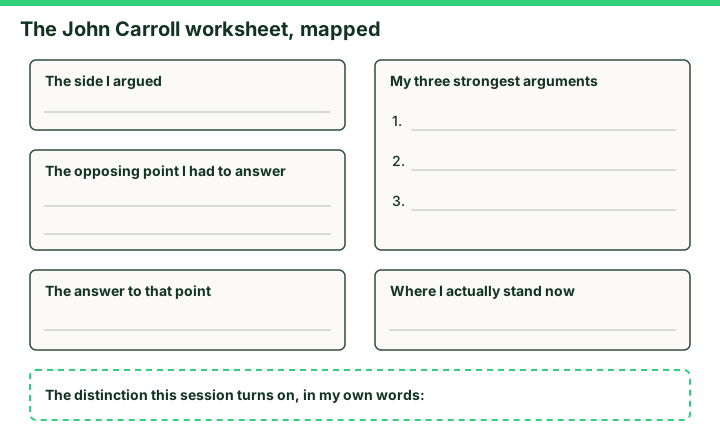
Figure finding: Five boxes mapping the John Carroll worksheet: the side I argued, my three strongest arguments with three numbered lines, the opposing point I had to answer, the answer to that point, where I actually stand now, and a dashed strip for the distinction this session turns on, in my own words.
Uncertainty: This is a composite classroom scenario. Missing history, measurements, or confirmation tests remain unknown and limit the conclusion.
- CER:
- Claim, Evidence, Reasoning: make a claim, back it with evidence, explain your reasoning.
- SOP:
- Standard Operating Procedure, the exact steps to follow (especially in a lab).
- Tracker:
- Your PLTW progress log where you record completed evidence.
- myPLTW:
- The PLTW course site where you do the online activities. Find it in Clever with your Microsoft sign-in, right next to Schoology.
Tap the speaker to hear a term. Add two of these to your notebook glossary with a definition and an example in your own words.
Pick just 2 or 3 words from today and make them yours: write what each one means in your own words, name the context clue or evidence that helped, then give one example from what you actually did in JCU bioethics 6: Cochlear implants before the age of consent. Try your own words first; the glossary is there if you get stuck. This is voluntary and counts as extra credit, so keep it short.
Saved on this device. Show Mr. Mendoza or add these to your notebook glossary to claim the extra credit.
Part 2 of 4 · Directions in plain English▸
2.1 Open your materials
Use the materials named in the first step below. Open lesson resources.
2.2 Start the work
Bring your preparation assignment. It is the strongest evidence you will carry into the room. If you do not have it, tell Mr. Mendoza before the session starts. You still argue and you still write: the scenario is read aloud at the start, and this page gives you the first argument on each side.
Show all 7 required steps
- Bring your preparation assignment. It is the strongest evidence you will carry into the room. If you do not have it, tell Mr. Mendoza before the session starts. You still argue and you still write: the scenario is read aloud at the start, and this page gives you the first argument on each side.
- Your side is assigned before the debate and sent through Jupiter. Prepare both sides so you can defend yours and answer the strongest opposing argument. You may be arguing the side you disagree with.
- Open with the icebreaker: What is your dream job, and why?
- Read the scenario together, then take five minutes with your side to pick your three strongest arguments and decide who leads.
- Argue. Every claim needs a reason, and a reason someone else could check.
- Answer the other side's strongest point directly. Restating your own point is not a rebuttal.
- Close by writing where you actually stand now, and what moved you.
Lost your place? Find the side you were assigned and your three strongest arguments. If you have those, move to the rebuttal: what is the other side's best point, and what is your answer to it?
- 0-5 minScenario read together; teams take their tables
- 5-22 minFacilitated debate, John Carroll leading
- 22-33 minRebuttals: answer the other side's strongest point, not its weakest
- 33-40 minWrite where you now stand and what moved you
- 40-80 minPLTW work for this unit, picking up where the last class left off
- • John Carroll has the first half of the block, about 40 minutes. The second half is PLTW work for this unit.
- • You know your side before you walk in. Build your case in depth, and come ready to answer the other side's strongest point rather than its weakest.
- • A debate is not a fight to win. It is a way of finding out which argument actually survives contact with the other one.
- • Exit goal: you can state the best case against your own position, and say what you would need to change your mind.
PLTW connection and today's work
Bring your preparation assignment and use it. John Carroll runs the first 40 minutes, and you already know your side, so come with your case built and an answer to theirs. For the second half of the block, continue Activity 2.2.2 A Protein Problem in myPLTW, picking up where last class stopped.
Today's stopping point: The debate is the first 40 minutes. You are finished with it when you have written where you stand now and what moved you. The rest of the block is Activity 2.2.2 A Protein Problem.
PLTW activity titles identify the course connection. If your account will not open, use the posted materials for today and tell Mr. Mendoza. Do not mark an online activity complete unless you completed it.
Course connection
- John Carroll facilitates the first 40 minutes. Bring your preparation assignment; it is your evidence. The rest of the block is PLTW work for this unit.
Use the turn-in directions in Part 4 of this page. Do not create a second submission unless your teacher asks for one.
Show another explanation or a smaller first step
Need help? Choose a starting point
Part 3 of 4 · Worked example▸
This is a parallel case, not your own. Read it for the order of the work, then do your own in Part 4.
Parallel case, not today's prompt: A permanent implant could improve a child's sprint performance but offers no medical benefit and cannot be removed without another major procedure.
Claim: The enhancement should wait until the young person can give meaningful consent because the procedure is irreversible, nonmedical, and changes future choices.
Evidence: The implant provides a performance advantage but requires surgery and carries infection and revision risks. Less invasive training options remain available and do not close off a later decision.
Reasoning: Parents routinely authorize treatment that prevents immediate harm, but a permanent elective enhancement has a different benefit-risk balance. Waiting preserves the child's future autonomy without withholding necessary care.
Strongest opposing point and response: Parents may argue that early implantation creates the greatest competitive benefit. Competitive timing is not a medical emergency, and a possible advantage does not outweigh the child's later right to decide about an irreversible body change.
My position after the debate: I support the claim only with the limits named above. A strong ethics argument states the value being protected, uses evidence rather than preference, answers the best counterargument, and names the condition that could change the decision.
This model shows the level of evidence and organization needed to complete: A complete debate worksheet that names the assigned side, gives three evidence-based arguments, answers the strongest opposing point, and ends with the student's own position.
- Write one defensible claim.
- Choose specific evidence that supports the claim.
- Explain the scientific rule that connects the evidence to the claim.
Keep the structure. Replace the question, facts, measurements, and evidence. Then recheck units, vocabulary, and whether the conclusion goes beyond the evidence.
Also due today: Hand in the worksheet at the end of the session. If you were absent, hand in the CER described under the away route when you return. Put your period and code on the worksheet. Do not submit twice.
A review board sorts scientific evidence, stakeholder needs, possible benefits, possible burdens, and uncertainty before choosing a policy.
- Which statements are scientific evidence?
- Which statements express a value or priority?
- Who receives the benefit and who carries the burden?
Use science to estimate consequences, then state the value judgment and tradeoff that determine the decision.
A review-board model organizes reasoning but does not make one ethical principle automatically outweigh every other principle.
- • Evidence cards map to source-backed findings.
- • Stakeholder cards map to affected people and priorities.
- • The recommendation maps to an explicit tradeoff with a named uncertainty.
Part 4 of 4 · Your work▸
Check your work before submitting
- You can argue a position you were assigned rather than one you chose.
- You can state the strongest argument against your own side and answer it.
- You can separate what the evidence shows from what you believe about it.
4.1 Turn in your work
DueCheck the Schoology assignment for this day- Hand in
- Your worksheet: the side you argued, your three strongest arguments, the opposing point you had to answer, and where you actually stand now.
How to submit and name your file
Hand in the worksheet at the end of the session. If you were absent, hand in the CER described under the away route when you return. Put your period and code on the worksheet. Do not submit twice.
In Schoology, open your course and the assignment for this lesson. Attach your file, select Submit, and check that it appears in the submission.
PDF upload helpYou get two school days for every day you were absent, so this deadline moves with you.
Today's lesson is in Schoology
Each school day has one lesson page in Schoology that holds everything for the day: the goal, the story so far, every table and data value, the numbered steps, and what to turn in. Open it first and work from it. The other rows for this day, if any, are the score line for a paper quiz or test and the John Carroll debate item; they do not add work. Check Schoology for each deadline.
- Today's Lesson · Thu 10/29 · Wk10 · Debate day: John Carroll debate 8:00 to 8:40, then mitosis(today's lesson page: the goal, the data, the steps, and what to turn in are all on it)
- Wk10 CER: JCU bioethics 6, cochlear implants before the age of consent(the JCU bioethics CER)
Link will not open? Open Schoology, choose your course and section, and find the title shown above.
- CompleteEvery required part of the artifact is present, nothing left blank.
- AccurateThe science and the data are correct and match the evidence.
- Scientific reasoningYou explain your claim with evidence and reasoning (CER), not just an answer.
- Professional communicationClear, organized, labeled, and written the way a clinician or scientist would.
- SubmittedGo to Schoology to turn this in. Submit one PDF. Schoology attaches your name to your upload; on the page itself, write your period and code. Name the file: FirstName LastName - Assignment Title - YYYY-MM-DD.pdf. If you cannot get in, see Mr. Mendoza. Do not skip the work.
How this lesson connects
Keep using what you learned last class: A mutation's clinical severity is set by where it falls and how it changes the amino acid's chemistry, so identical-size changes can produce anything from no effect to a broken protein. Today: Should children reach the age of consent before cochlear implants or other medical interventions are allowed?
Practice: try a question, then check your answer▸
Claim ceiling for this check: Today's evidence supports a classroom claim about today's lesson. It cannot prove causation, diagnose a real patient, or justify action outside this room.
Practice an exam-style question on the worked-example page, which includes the answer and rationale.
Missed class or ready for more?▸
What today's skills lead to. These are real health-science careers this course builds toward. Tap one to see, on the US Department of Labor's O*NET site, what the job actually involves, what it pays, and how fast it is growing.
If you are away, write a full CER on the case question: argue both sides fairly, three arguments each with a named source, then state and defend your own position. Hand it to Mr. Mendoza when you return. You get two school days for every day you were absent, so this deadline moves with you.
Hand in the worksheet at the end of the session. If you were absent, hand in the CER described under the away route when you return. Put your period and code on the worksheet. Do not submit twice.
Class still runs. Complete today's work as this page describes (it is self-guided). Need the concept taught without a teacher? Use this authoritative explainer:
JCU Philosophy4KidzSources: slides, readings, and resources▸
The deck carries the prior idea forward, lets you inspect an analogy, maps the rule to biology, and ends with the same evidence decision and exit ticket used on this page.
This week
My Progress dashboard